
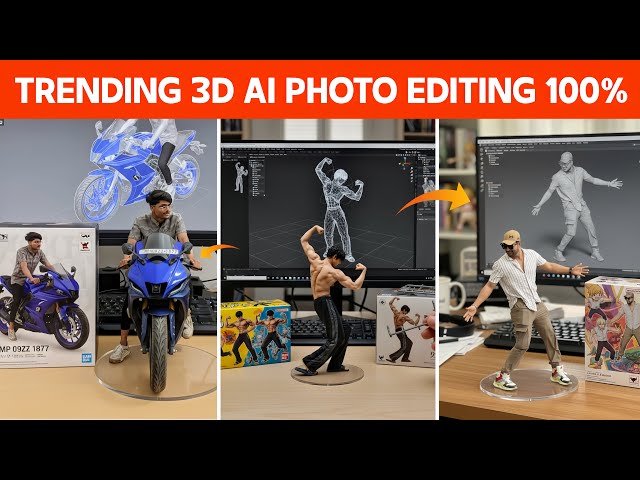
Figurine AI model photo editing prompt ka matlab hota hai ek detailed text instruction jo AI ko batata hai ki kis tarah ka figurine (statue / doll / toy-like model) banana hai aur usko photo editing style mein kaise render karna hai. Ye prompts AI image generators (jaise MidJourney, Stable Diffusion, Bing Image Creator, DALL·E, BlueWillow, ya koi Figurine-special AI tool) ke liye use hote hain.
The best part? This AI tool is 100% free, and unlike many other platforms, it doesn’t put any restrictions on the number of images you can create.In the next section, I’ll share the easy step-by-step process along with sample prompts you can directly copy and use. This way, you can instantly create your own celebrity selfies and share them on social media.
Google Nano Banana AI Explained (2025 Guide)
Google Nano Banana AI is Google’s latest AI-powered image generation and editing tool, integrated within the Gemini AI platform. It lets you create or modify photos instantly just by typing simple text prompts. With this tool, you can easily remove or replace objects, change backgrounds, merge multiple photos, or apply different styles in seconds.
What makes it stand out is its ability to maintain visual consistency across edits, so the results look more natural and realistic. For transparency, every generated image includes a small watermark. Best of all, Nano Banana AI is fast, free, and user-friendly, making it perfect for anyone who wants to explore creative photo editing without limitations.
Key Features of Google Nano Banana AI
AI-Powered Editing – Create or edit images simply by typing text instructions.
Object Removal & Replacement – Easily erase unwanted objects or replace them with new ones.
Background Editing – Change, blur, or enhance backgrounds with a single prompt.
Photo Merging – Combine multiple photos seamlessly into one frame.
Style Adjustments – Apply different artistic or cinematic styles to your images.
Consistency in Results – Maintains natural appearance across multiple edits.
Built-In Transparency – Every photo includes a watermark for clarity and authenticity.
Free & Easy to Use – No cost, no limits—perfect for beginners and creators alike.
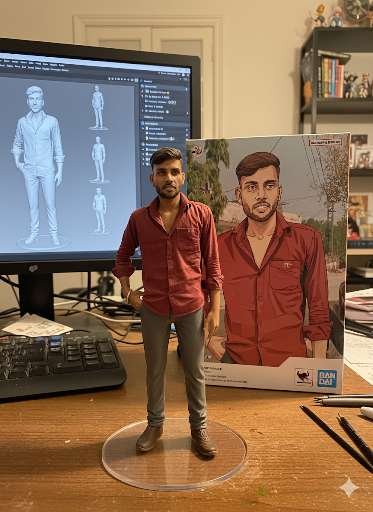
prompt⤵️
Using the nano-banana model, create a 1/7 scale commercialized figurine of the characters in the picture, in a realistic style, in a real environment. The figurine is placed on a computer desk. The figurine has a round transparent acrylic base, with no text on the base. The content on the computer screen is the brush modeling process of this figurine. Next to the computer screen is a BANDAI-style toy packaging box printed with the original artwork., The packaging features two-dimensional flat illustrations.Please turn this photo into afigure.Behind it, there should be a Model packaging box with the character from this photo printed on it. In front of thebox.on a round plastic baseplace the fiqure version of thephoto I gave you. I’d like the PVC material to be clearlyrepresented.It would be even better if the background is indoors.
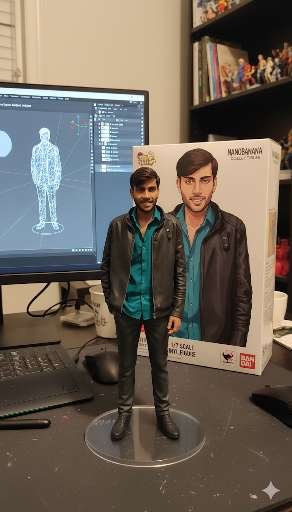
prompt⤵️
Using the nano-banana model, create a 1/7 scale commercialized figurine of the characters in the picture, in a realistic style, in a real environment.
The figurine is placed on a computer desk. The figurine has a round transparent acrylic base, with no text on the base. The content on the computer screen is the brush modeling process of this figurine. Next to the computer screen is a BANDAl-style toy packaging box printed with the original artwork., The packaging features two-dimensional flat illustrations.
Please turn this photo into afigure. Behind it, there should be a Model packaging box with the character from this photo printed on it. In front of thebox.on a round plastic baseplace the fiqure version of thephoto I gave you. I’d like the PVC material to be clearlyrepresented. It would be even better if the background is indoors.
Click on the “Create Your Photo” button below, and then you will be redirected to Google Gemini’s Official website, where you first need to sign in with your Google account, and then upload your photo and paste the above copied text in the text box. After a few seconds, your image will be ready.
prompt ⤵️
The human hand picks up this 3D mode
Quick Way to Fix Face Problems Without Account
I know, guys, sometimes you might face issues like face distortion, blur, or the face not matching the original image. Therefore, I am sharing a new method to fix these facial problems. Just follow the steps below:
- First, click on the given button below.
- Once you click, you will be directed to a face swap website.
- Tap on the Face Swap button and scroll down.
- Upload your ChatGPT-generated image along with your own face image.
- Now, click on the Start Face Swap button and wait.
Conclusion
I recently shared a new AI tool called Google Gemini (Nano Banana AI), which is quickly gaining popularity. With this tool, you can easily generate AI images from text prompts, similar to ChatGPT. In this article, I’ve also highlighted some of the common face-related issues that users often encounter while creating images with ChatGPT or Google Gemini—and provided a simple solution to fix them.
I hope this guide helps you understand everything clearly. If you still face any problems while generating AI photos, feel free to drop your query in the comment section, and I’ll get back to you as soon as possible.