
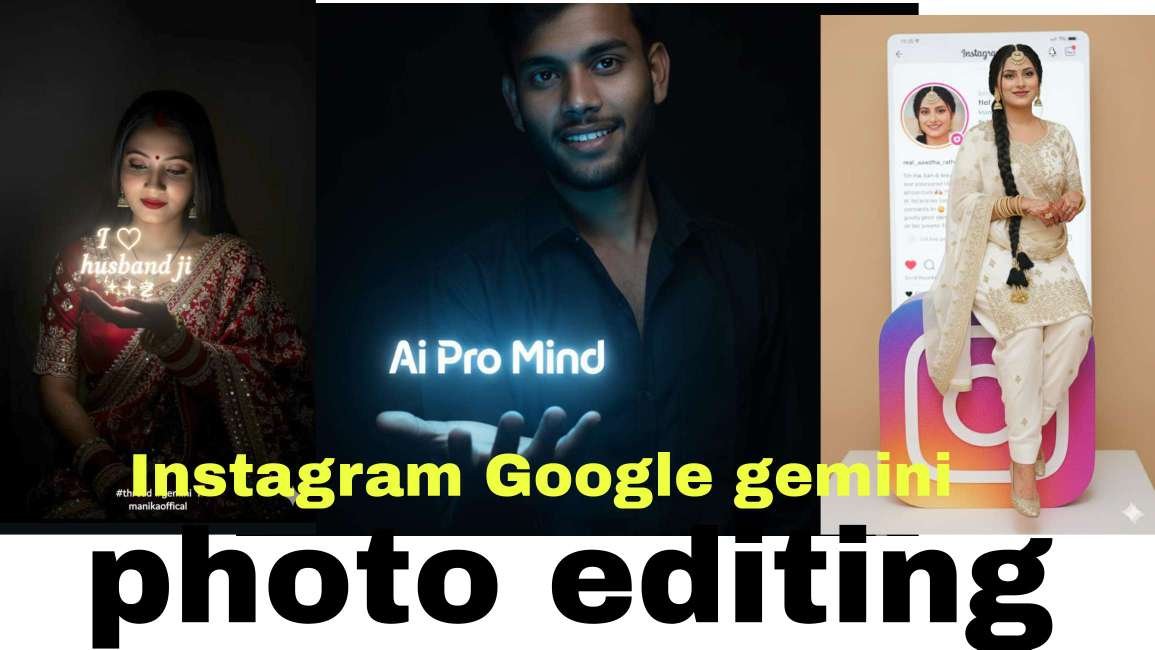
In this article, I’m going to share some of the most popular and trending Google Gemini prompts that you can use to create stunning and aesthetic images completely free. All you need to do is follow the simple steps I’ve explained below. With AI, you no longer have to waste hours editing photos or asking someone else to do it for you. This is the era of smart AI tools that make almost every task easier—whether it’s education, content creation, or creative photo editing. I’ve broken everything down step by step, but if you still have any questions, feel free to drop them in the comments or reach out on my social media.
New trand style Photos – The Biggest Editing Trend in 2025
This trend is super exciting because it’s loved by both girls and boys. Girls often create these kinds of retro-style images for their Instagram posts or personal interests, while boys sometimes use them to make creative edits for their crushes. With Google Gemini’s powerful AI features, this becomes even easier and more fun. If you want to impress someone, all you need is a clear photo—upload it, generate the edit, and share the results. The outcome looks so amazing that it’s sure to leave a lasting impression.
Below, I’ve shared multiple Google Gemini prompts for photo generation. You can simply copy and paste them into the Google Gemini app or website. Boys can upload a photo of their crush, while girls can upload their own selfies. Within seconds, the AI will create a stunning image that you can download and instantly share on Instagram, Facebook, or any social media platform to grab tons of likes, comments, and attention.

Prompt⤵️
Use reference image to create Ultra Realistic ultra Resolution cinematic 8k detail A young girl face hair and body match from uploaded image wearing a red lehenga, He left hand holding glowing text that ” i love my husband” 💕’ in insta logo jayaa font tylish name in his one hand. The scene is dark, with the glowing text illuminating his face and hands. The style is a realistic photograph with dramatic, low-key lighting

prompt⤵️
Use reference image to create Ultra Realistic ultra Resolution cinematic 8k detail A young men face hair and body match from uploaded image wearing a black shirt, He left hand holding glowing text that “Ai Pro Mind” shawon’ in insta logo jayaa font tylish name in his one hand. The scene is dark, with the glowing text illuminating his face and hands. The style is a realistic photograph with dramatic, low-key lighting

prompt⤵️
Create a 1/7 scale commercial sculpture of the characters in the picture, in a realistic style, in a real environment. Featuring the characters based on the photos I’ve included. The characters sit casually on top of a large Instagram social media logo, with fine textured details in a modern animation style. Use soft studio lighting to create a professional impression, with a glossy effect that makes the logo appear shiny and has Instagram signature gradient color. The background features a realistic Instagram profile page, with the username ” real_aastha_rathore “and a profile picture from a photo I’ve included. The overall color scheme is vibrant and clean, giving it a modern, bright, and professional feel
Step-by-Step Guide to Making new trand style Photos Edits
Download the App:Start by downloading the Google Gemini app from the Play Store or App Store.
Login with Google:Once installed, log in using any Google account.
Upload a Photo:Boys can upload their crush’s picture, while girls can upload their own photo.
Add a Prompt:Type in your custom prompt or simply paste one from the ready-made list.
Generate Your Image:Tap on the generate button (arrow icon) and wait a few seconds for your AI-edited photo.
Google Gemini’s New Feature Explained
Recently, Google rolled out a new feature called Nano Banana AI, and it’s truly impressive. This tool delivers highly accurate and visually stunning results based on any prompt—whether it’s generating images, creating videos, or answering questions within seconds.
What makes Nano Banana AI special is its ultra-fast performance, high-quality outputs, and creative precision, making it one of the most powerful AI tools for modern creators. From designing eye-catching graphics to producing engaging videos or getting instant smart answers, Nano Banana AI takes creativity and productivity to the next level.
The Bottom Line
In this article, I discussed the trending new trand style photo editing using Google Gemini’s latest feature, Nano Banana AI. This tool is not only fun but also highly useful for creating stunning photos in just a few seconds. I also shared some of the best Gemini prompts for generating viral and aesthetic images for free, along with a simple step-by-step guide. I hope this post was both helpful and informative for you.