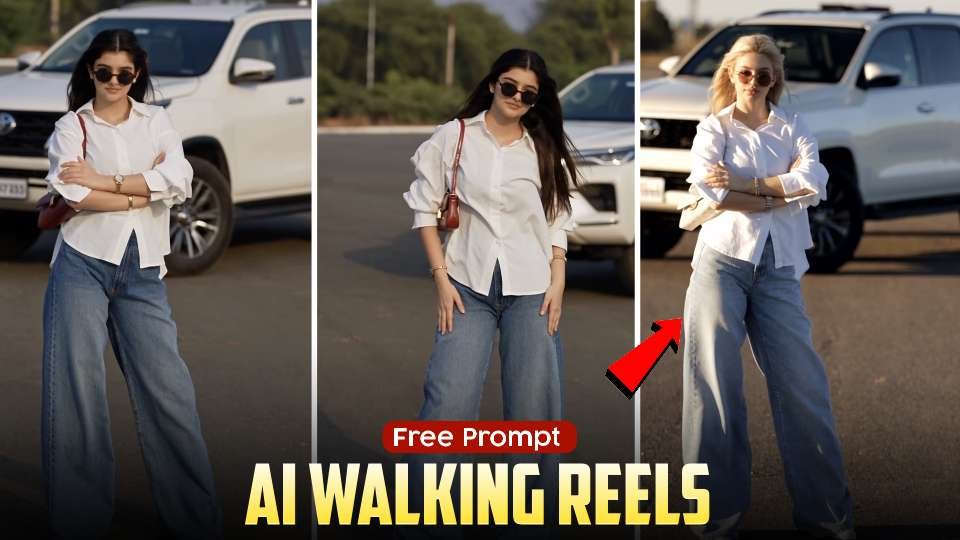
AI Walking Reels are becoming a popular trend on Instagram, with creators using AI tools to transform ordinary photos into stylish, realistic walking videos. These videos feature fashionable outfits, sunglasses, natural body movements, cinematic camera angles, and beautiful outdoor backgrounds. With the right AI prompt, you can turn a single photo into an eye-catching video without recording yourself walking in front of a camera.If you want to create trending AI walking videos for Instagram Reels, this guide will help you understand how to prepare your photo, write effective prompts, generate realistic walking animations, and create content that looks professional.
What Are AI Walking Reels?
AI Walking Reels are short videos created using artificial intelligence that make a person in a photo appear to walk naturally. Instead of recording a real video, you can start with a single image and use an AI video generator to animate the person.The popular style shown in this thumbnail features a person wearing an oversized white shirt, wide-leg blue jeans, fashionable sunglasses, and accessories, standing in front of a white SUV. AI video tools can use a similar visual style to create cinematic fashion videos with realistic movements.These videos are suitable for Instagram Reels, YouTube Shorts, Facebook Reels, fashion content, digital portraits, and creative social media posts.
How to Create AI Walking Reels From a Photo
Creating an AI walking video is simple when you have a good photo and a suitable AI video generator. First, select a clear, full-body photograph with the face, outfit, and background visible. Images with good lighting and minimal obstructions generally provide a better starting point.Next, open an AI video generation tool that supports image-to-video creation. Upload your photograph and enter a prompt describing the walking movement, camera motion, lighting, and overall video style.Choose a vertical aspect ratio of 9:16 for Instagram Reels. If the tool offers video duration and motion settings, select the options that best match your desired result.Generate the video and review the output. If the walking movement looks unnatural, adjust the prompt to request slower steps, realistic body movement, and stable facial features
Free AI Walking Reel Prompt to Copy
You can use the following prompt as a starting point for creating your own AI walking video. Upload your photograph to an image-to-video AI tool and paste this prompt into the video generation field.
Best AI Tools for Creating Walking Videos
Several AI video generators support image-to-video creation. The features available to you may depend on the platform, subscription, and current usage limits.Google’s Google Flow can help creators explore AI-generated video workflows. You can visit the official Google Flow website� to check its current features and availability.Another option is Kling AI, which offers AI video generation capabilities. Visit the official Kling AI website� to explore its available tools.You can also explore Runway for AI-powered video generation through its official Runway website�.Before choosing a tool, check whether it supports image-to-video generation, natural human movement, vertical video output, and the number of free generations available. Free access and usage limits can change.
Tips to Make Your AI Walking Reels Look Realistic
The quality of your original photograph plays an important role in the final video. Choose a clear image in which the person’s full body is visible. A photograph with good lighting and a simple background can help the AI interpret the subject more accurately.Describe the walking movement clearly in your prompt. For example, ask for slow, confident steps, natural arm movement, realistic clothing motion, and a smooth tracking camera. Avoid adding too many complicated actions to a short video.For a cinematic fashion look, use warm sunlight, realistic shadows, shallow depth of field, and a softly blurred background. Keep the camera movement smooth instead of requesting several rapid angle changes.Always review the generated video before uploading it. Check the face, hands, legs, clothing, and background for visual errors. If necessary, generate another version with simpler movement instructions.
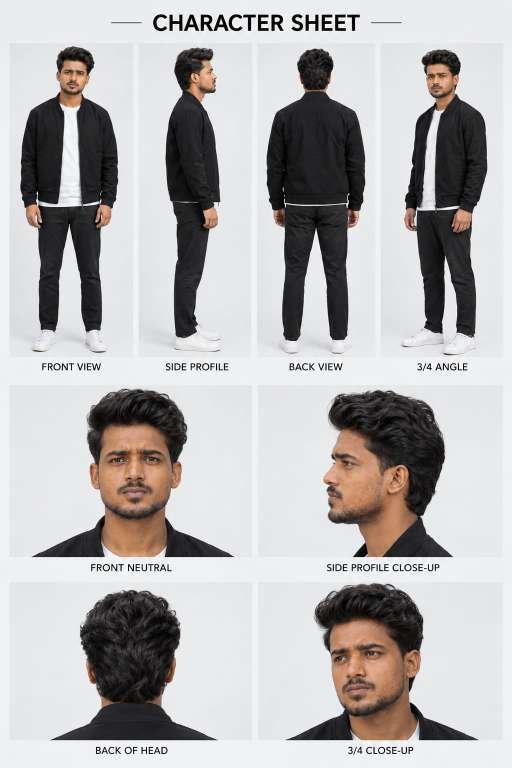
🚀 Create a highly realistic, professional CHARACTER REFERENCE SHEET using the uploaded photograph as the PRIMARY and ONLY identity reference.
IMPORTANT: The uploaded photograph defines the exact identity of the person. Generate a complete, consistent character reference sheet with multiple views of the SAME person.
━━━━━━━━━━━━━━━━━━━━━━━━━━━━
1. STRICT IDENTITY LOCK
━━━━━━━━━━━━━━━━━━━━━━━━━━━━
Preserve the person’s identity with maximum possible accuracy.
Maintain the exact original:
Facial structure and face shape
Eyes, eyebrows, nose, lips, and ears
Jawline, chin, and cheekbones
Natural skin tone and skin texture
Hairstyle, hairline, hair volume, and hair texture
Beard, moustache, and facial hair pattern
Age appearance and natural facial proportions
Body proportions, height appearance, and build
Do not beautify, redesign, stylize, or create a different person.
Do not change the person’s face between views.
Every panel must depict the exact same individual.
If a full-body reference is provided, preserve the original body proportions. If only a portrait is provided, use realistic, natural body proportions without exaggeration.
━━━━━━━━━━━━━━━━━━━━━━━━━━━━
2. OUTFIT CONSISTENCY
━━━━━━━━━━━━━━━━━━━━━━━━━━━━
Dress the character in a simple, realistic, all-black casual outfit:
Black bomber jacket
Plain white crew-neck T-shirt
Black trousers
Clean white sneakers
Keep the outfit identical across all full-body views.
Use realistic fabric texture, natural wrinkles, accurate clothing construction, and consistent garment details.
If a different outfit is explicitly requested, use that outfit consistently throughout the sheet.
━━━━━━━━━━━━━━━━━━━━━━━━━━━━
3. TOP ROW — FULL-BODY VIEWS
━━━━━━━━━━━━━━━━━━━━━━━━━━━━
Create four separate, evenly sized, full-body photographs arranged horizontally.
PANEL 1 — FRONT VIEW:
The character stands upright, facing directly toward the camera.
Neutral facial expression, relaxed shoulders, arms naturally resting at the sides.
Show the entire body from head to shoes.
PANEL 2 — SIDE PROFILE:
Show the character in a true 90-degree side profile, facing toward the right.
Clearly display the forehead, nose, lips, chin, jawline, ear, hairstyle, and body silhouette.
Natural standing posture.
PANEL 3 — BACK VIEW:
Show the character standing with their back directly toward the camera.
Clearly display the back of the hairstyle, jacket, trousers, and shoes.
PANEL 4 — THREE-QUARTER VIEW:
Show the character at approximately a 45-degree angle toward the camera.
The face should remain clearly visible.
Use a relaxed, natural standing posture.
━━━━━━━━━━━━━━━━━━━━━━━━━━━━
4. MIDDLE ROW — FACE CLOSE-UPS
━━━━━━━━━━━━━━━━━━━━━━━━━━━━
Create two large, highly detailed portrait panels.
PANEL 5 — FRONT NEUTRAL CLOSE-UP:
A straight-on facial portrait.
Neutral expression, eyes looking directly at the camera.
Clearly show the face, hairstyle, eyebrows, eyes, nose, lips, beard, and natural skin texture.
PANEL 6 — SIDE PROFILE CLOSE-UP:
A true side-profile portrait at approximately 90 degrees.
Show the exact side profile of the same person’s face.
Preserve the nose shape, forehead, lips, chin, jawline, ear, beard, and hairstyle.
━━━━━━━━━━━━━━━━━━━━━━━━━━━━
5. BOTTOM ROW — ADDITIONAL FACE DETAILS
━━━━━━━━━━━━━━━━━━━━━━━━━━━━
Create two additional close-up panels.
PANEL 7 — BACK OF HEAD:
Show the back of the character’s head and hairstyle.
Accurately preserve the hair length, volume, texture, and natural hairline.
PANEL 8 — THREE-QUARTER FACE CLOSE-UP:
Show the same character’s face at approximately a 45-degree angle.
Keep the eyes, nose, lips, jawline, facial hair, and hairstyle consistent with the primary reference.
The expression should remain natural and neutral.
━━━━━━━━━━━━━━━━━━━━━━━━━━━━
6. COMPOSITION AND LAYOUT
━━━━━━━━━━━━━━━━━━━━━━━━━━━━
Create a clean, premium, professional character reference sheet.
CANVAS:
Vertical portrait layout, approximately 2:3 aspect ratio.
LAYOUT:
Large, bold title centered at the top:
CHARACTER SHEET
Top row: four equal-sized full-body panels.
Middle row: two equally sized facial close-up panels.
Bottom row: two equally sized detail panels.
Consistent spacing between every panel.
Thin, clean gutters separating the photographs.
Clear, balanced alignment and symmetrical margins.
Add small, neatly positioned labels beneath each panel:
FRONT VIEW
SIDE PROFILE
BACK VIEW
3/4 ANGLE
FRONT NEUTRAL
SIDE PROFILE CLOSE-UP
BACK OF HEAD
3/4 CLOSE-UP
Use clean, uppercase, black sans-serif typography.
Ensure every label is spelled correctly and remains readable.
━━━━━━━━━━━━━━━━━━━━━━━━━━━━
7. PHOTOGRAPHIC STYLE
━━━━━━━━━━━━━━━━━━━━━━━━━━━━
Photorealistic professional studio photography.
Use:
A clean, seamless, light-gray studio background
Soft, evenly distributed studio lighting
Natural shadows
Realistic skin pores and fine facial details
Sharp facial features
Accurate hair strands
Realistic clothing textures
Neutral color grading
Consistent exposure and white balance
Professional DSLR photography aesthetics
Use a natural perspective without exaggerated wide-angle distortion.
Full-body photographs should be framed from head to toe without cropping.
Close-up photographs should clearly reveal facial details.
Maintain consistent lighting, background, camera perspective, and image quality across all panels.
The result must look like a professionally photographed character model reference sheet, not a collage of unrelated AI-generated people.
━━━━━━━━━━━━━━━━━━━━━━━━━━━━
8. STRICT NEGATIVE INSTRUCTIONS
━━━━━━━━━━━━━━━━━━━━━━━━━━━━
No identity changes.
No different faces between panels.
No hairstyle changes.
No beard or moustache changes.
No skin-tone changes.
No facial beautification.
No artificial skin smoothing.
No cartoon, anime, illustration, or 3D-rendered appearance.
No exaggerated muscles or body proportions.
No extra fingers or malformed hands.
No duplicated limbs.
No incorrect side profiles.
No inconsistent clothing.
No cropped shoes in full-body views.
No overlapping panels.
No distorted facial features.
No random accessories.
No watermarks.
No unnecessary decorative graphics.
FINAL OBJECTIVE:
Generate one complete, high-resolution, photorealistic character reference sheet containing eight clearly separated views of the same real person.
Identity consistency and facial accuracy are the highest priorities.
Use the uploaded photograph as the identity source, not as an image to recreate only once.
Every panel must represent the same individual from a different camera angle or framing.
video prompt ⬇️
Use the provided reference video ONLY as a motion, camera, timing, and performance reference,
and use the provided target image as the absolute visual identity reference.
CORE INSTRUCTION
Recreate the video using the person/character from the target image, while accurately
transferring the movement and camera behavior from the reference video.
The target image must remain the source of truth for the character’s appearance.
CHARACTER PRESERVATION — ABSOLUTE PRIORITY
Keep the character from the target image exactly consistent throughout the entire video:
● Same face
● Same facial structure and proportions
● Same eyes, eyebrows, nose, lips and jawline
● Same skin tone and realistic skin texture
● Same hairstyle
● Same hair length, shape, texture and hairline
● Same body shape and proportions
● Same clothing
● Same clothing color, fabric, design and details
● Same accessories
● Same overall identity and appearance
Do NOT redesign, beautify, replace, modify, age, de-age or reinterpret the person.
Do not change the outfit or hairstyle even when the body moves.
MOTION TRANSFER
Analyze the reference video frame-by-frame and reproduce its movement as accurately as
possible:
● Head movement ● Facial expressions
● Eye direction and gaze
● Eyebrow movement
● Mouth movement
● Blinking
● Neck movement
● Shoulder movement
● Arm and hand movement
● Upper-body movement
● Walking or body movement
● Body posture
● Natural weight shifting
● Timing and rhythm of movements
● Start and end positions of movements
The target character should perform the same actions and movements as the person in the
reference video, while remaining visually identical to the target image.
CAMERA MOTION TRANSFER
Copy the camera behavior from the reference video:
● Camera position
● Camera angle
● Camera distance
● Camera height
● Camera movement
● Handheld movement
● Camera shake
● Push-in / pull-out
● Pan / tilt
● Tracking movement
● Framing
● Subject positioning
● Perspective changes
● Movement speed
Do not introduce new camera movements that are not present in the reference video. FACIAL PERFORMANCE
Transfer the facial performance naturally and accurately.
Match the reference video’s:
● Expression intensity
● Smile or neutral expression
● Eye movement
● Eyebrow movement
● Head tilt
● Lip movement
● Emotional timing
However, never alter the target person’s facial identity.
The face must remain recognizable as the exact same person from the target image in every
frame.
REALISM
Create highly realistic motion with natural human biomechanics.
Avoid:
● Face morphing
● Identity drift
● Facial distortion
● Melting features
● Unnatural eye movement
● Extra fingers
● Missing fingers
● Deformed hands
● Body warping
● Clothing changes
● Hair changes
● Artificial facial expressions
● Rubber-like movement
● Flickering
● Frame-to-frame inconsistency
Hands, arms, face, hair and clothing must remain anatomically and visually consistent
throughout the video. TEMPORAL CONSISTENCY
Maintain strong frame-to-frame consistency.
The character’s:
● Face
● Hair
● Body
● Clothing
● Accessories
● Skin texture
must remain stable throughout the entire sequence.
No random changes between frames.
COMPOSITION
Maintain the same composition and subject framing as the reference video wherever possible.
If the reference person moves closer or farther from the camera, reproduce the same relative
movement with the target character.
OUTPUT
Aspect ratio: 9:16 vertical
Create a cinematic but natural-looking vertical video suitable for TikTok, Instagram Reels and
YouTube Shorts.
The final result should look like the exact person from the target image naturally performing the
exact movement and camera performance from the reference video.
PRIORITY ORDER
When there is any conflict, follow this priority:
1. Target image identity and appearance
2. Reference video motion and performance
3. Reference video camera movement
4. Natural physics and realism
5. Visual style Do not copy the reference person’s identity or appearance. Copy ONLY their motion,
expressions, body movement, timing and camera movement.
The final video must look natural, realistic, stable, and physically believable.
AI Walking Reels offer a creative way to transform ordinary photographs into realistic fashion-style videos using artificial intelligence. With a clear reference image, a well-written walking prompt, and a suitable AI video generator, you can create cinematic clips for Instagram Reels without recording a real walking video.Start with the free AI walking prompt provided in this guide, experiment with different camera movements, and adjust the results until you achieve the style you want. Whether you are creating fashion content, personal photo animations, or trending social media videos, AI walking reels can help you explore new creative possibilities.