

Free Fire Logo Editing Google Gemini Prompt
In today’s digital era, photo editing is no longer just about adjusting brightness or adding filters. With the rise of AI-powered tools, 3D photo editing has become a trend, giving images a lifelike and cinematic touch. One such powerful innovation is Google Gemini 3D Photo Editing. Whether you are a content creator, YouTuber, or social media influencer, this tool helps you transform ordinary images into professional 3D-style masterpieces.In this blog, we will explore what Google Gemini 3D Photo Editing is, how it works, its features, and how you can use it to create vi
What is Google Gemini 3D Photo Editing?
Google Gemini is an advanced AI model developed by Google DeepMind, designed to understand text, images, videos, and more. Using this technology for photo editing allows users to create high-quality 3D effects with realistic depth, shadows, and cinematic lighting.Unlike traditional editing apps, Gemini uses AI prompts where you describe the style, effect, or transformation you want, and the system automatically generates stunning 3D visuals.
Why Google Gemini Is Perfect for free fire photo editing
Here’s why Gemini is trending for free fire 2025 photo edits:
1. AI-Generated Glow Effects: Add diya lights, fireworks, and sparkler effects in second.
.2. Traditional Indian Themes: Sarees, kurtas, rangolis, and festive jewelry are easily added.
3. Same Face Accuracy: Keep your exact face and expressions even after full AI transformation.
4. High-Resolution Output: Perfect for websites, posters, or social media campaigns.
5. Quick and Easy: No Photoshop or Lightroom skills needed — just type and generate.
ALL PROMPT COPY ⤵️
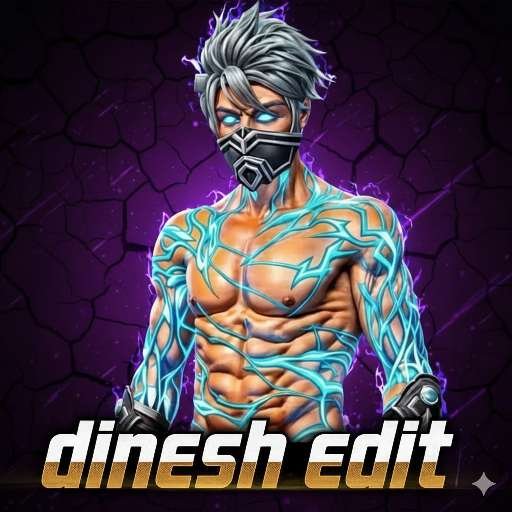
1.PROMP⤵️
IMAGE 1 = Reference PFP (style reference only)IMAGE 2 = My character (use ONLY this)Create a high-quality gaming profile picture exactly identical to IMAGE 1 in style, background, fonts, lighting, and effects.Apply these rules STRICTLY:1. Use IMAGE 1 only for style reference. Do NOT use its character.2. Remove the background from IMAGE 2 and place ONLY my character.3. Match the character placement exactly as in IMAGE 1: same size, position, lighting, and angle.4. IMPORTANT FIXES: – Make the purple neon outline/glow follow the exact contour of MY CHARACTER’S BODY (arms, torso, head), not the old character shape. – Remove the small horn/spike shape above my character’s head completely.5. Text Replacement: – Replace “mkeditor” with dinesh edit (same font, thickness, angle, color, placement). – Replace “mkeditor” with *dinesh edit* in the exact same style and location.6. Recreate the exact effects: – Same purple neon aura – Same cracked purple/black background – Same anime strokes – Same glitch particles – Same lighting streaks – Same color grading, sharpness, contrast7. Do NOT modify any other element. Keep everything identical to IMAGE 1 except character and text.8. Final Output: – 100% identical remake of IMAGE 1 but with: • MY character • YOUR NAME+ YOUR NAME !! • Glow perfectly adapted to my character • Spike above head removed – Canvas: SQUARE (1:1)
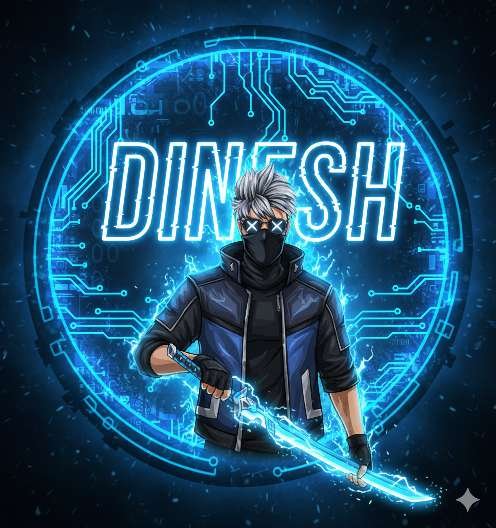
2.PROMOT⤵️
Create a gaming logo using the reference image exactly as it is. Do not change the face, facial structure, skin tone, hairstyle, mask design, body pose, clothing, colors, sword, or background composition. Keep everything 100% identical to the reference photo with no changes at all. Preserve the same hat, black mask with glowing white X eyes, blue-and-black jacket, and glowing sword with neon energy effects. Recreate the same circular cyberpunk background with neon blue electric effects, circuit patterns, sparks, and aura lighting. Maintain the same lighting style, colors, glow effects, and overall Free Fire esports logo look.Add glowing bold text **”DINESH”** behind the character in the same style as the existing background text, large and centered, glitch neon style, electric blue and white glow, matching the reference design without changing any elements.Everything must remain identical—only enhance sharpness, clarity, and detail. No changes to character or design in any way.
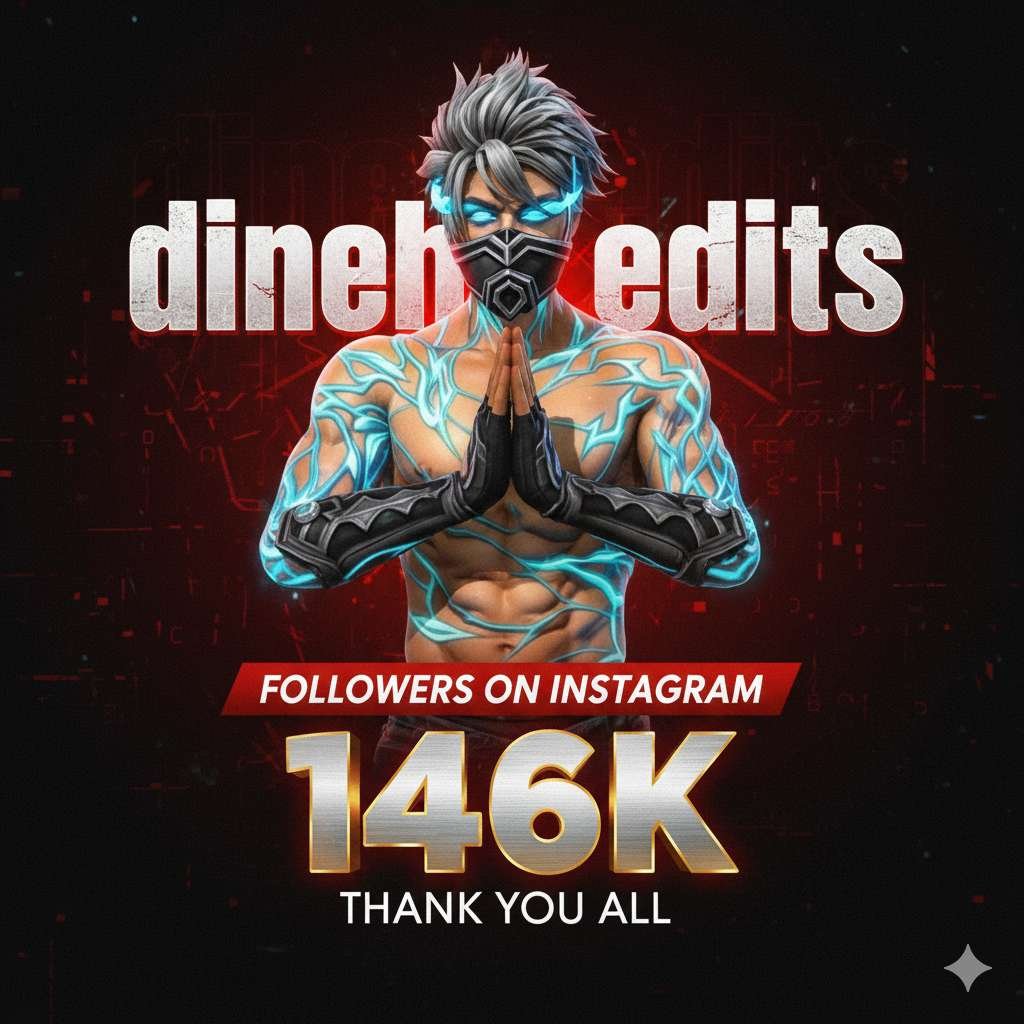
3.PROMPT⤵️
A dramatic, high-contrast digital art piece featuring a wearing a same dress same hair same as uploaded, his hands pose namaste. He is positioned centrally, slightly above the middle of the frame. The background is a gradient of deep, rich reds and blacks, with subtle, almost subliminal textured patterns or digital interference effects, creating a dynamic and slightly gritty atmosphere. Superimposed behind him, in a large, bold, distressed, and metallic-textured white font with red glowing edges, are the letters ‘dinesh edits’ or similar abstract, powerful typography, partially obscured by his head and shoulders. Below him, prominently displayed, is the text ‘FOLLOWERS ON INSTAGRAM’ in a clear, impactful red banner font. Underneath that, a massive, metallic, three-dimensional ‘146K’ in a brushed silver and gold finish with glowing red highlights, casting subtle shadows. Finally, below the ‘146K’, ‘THANK YOU ALL’ is written in a clean, sans-serif white font, slightly smaller than the banner text. The overall lighting is moody and theatrical, with a strong focus on highlights and shadows that define the subject’s features and the metallic textures of the typography. The aesthetic should evoke a sense of digital achievement, gratitude, and a powerful online presence, with a slight visual noise or grain for an added edge. The image should be portrait oriented, capturing a dynamic, engaging moment.”(dont change the uploaded dresss)
Key Features of Google Gemini 3D Photo Editing
Realistic 3D Depth – Add layers, shadows, and highlights to make photos look three-dimensional.Cinematic Effects – Create professional movie-like scenes with lighting and contrast.AI-Powered Prompts – No need for manual editing; just type what you want.Custom Backgrounds – Replace or enhance backgrounds with high-resolution 3D visuals.Easy for Beginners – Even without editing skills, anyone can create professional results.
How to Use Google Gemini for 3D Photo Editing
Viral Content Creation – Eye-catching 3D photos get more likes, shares, and engagement.Professional Look – Great for YouTube thumbnails, posters, and digital marketing.Time-Saving – No need for complex tools like Photoshop; Gemini does the job in seconds.Free or Low-Cost – Many features are available without expensive subscriptions.
Conclusion
Google Gemini 3D Photo Editing is a game-changer for digital creators. With AI-powered tools, anyone can create cinematic, professional, and realistic 3D images without needing advanced editing skills. Whether you want to design viral social media posts, eye-catching YouTube thumbnails, or creative digital art, Gemini makes the process simple and powerful.The future of photo editing is here, and it’s 3D – powered by Google Gemini!
ABOUT ME-
My website name Mkedit. and my real name is gaurav solanki. I’m a social media influencer and a full-time YouTuber with over 30k subscribers. or 500k followers in instagram I create content about photo editing, reel video editing, and CapCut templates, and bing image creating prompts,which I share on my Instagram thanks for visit my website